
School messaging software: WhatsApp, SMS and app alerts
Skoo lets each school decide which messages go to parents, by which channel, and at what time. Absence alerts, fee reminders, results, homework and notices can use the app, WhatsApp, SMS or email, with parent consent and a report of what was delivered.
Your rules for every message
Open Settings and Notifications. For each event, such as absence, late arrival, fee receipt, fee reminder, results, homework or gate scan, choose who gets it, which channels to try and in what order, and when.
Absence alerts go out after the class register is saved, with a short window of ten minutes by default so a correction does not send a wrong message. You can also send them all together at an hour you choose. You can switch on an alert for late arrival, and one for a student absent several school days in a row. Holidays do not break the count.
Channels
- App notifications to parents who have the app.
- WhatsApp through your own WhatsApp Business number, connected from Skoo. Six alert messages in English and Urdu are submitted to Meta from inside Skoo.
- SMS through any local provider you already use, by entering its address and field names, or through Twilio.
- Email.
Bulk messages and notices
Pick an audience: all parents, some classes, today's absentees, defaulters owing more than an amount you set, a van route, or staff. Skoo shows a count before you send: how many people, how many by app, WhatsApp and SMS, and how many cannot be reached. Each family gets one message, even with several children.
Write in English, add Urdu if you want, and send now or schedule it. Announcements can notify the class or role they are for.
Your own wording
Every automatic message has a text editor with English and Urdu, token chips for the student name and amounts, and a preview with sample values. Reset to Skoo's text at any time. The Message templates page shows every message as parents read it.
Consent, limits and reports
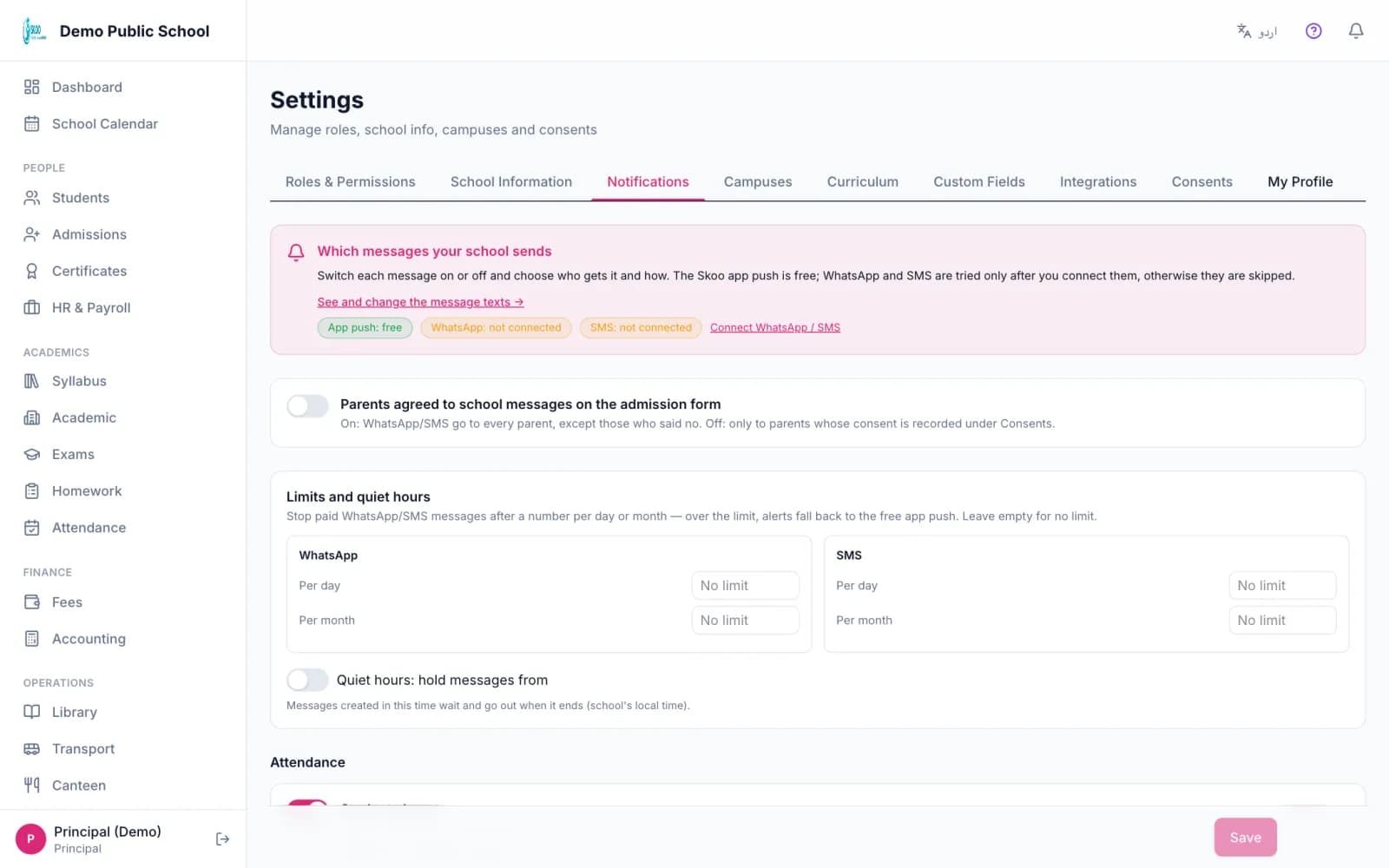
- Parents can switch off kinds of school messages in the app, except school notices, and allow WhatsApp or SMS for each child.
- A parent who replies STOP on WhatsApp is switched off for their children, and START turns it back on.
- Daily and monthly limits for WhatsApp and SMS. When a limit is reached, the alert falls back to the next channel, such as a free app notification.
- Quiet hours hold messages until the window ends.
- A delivery report shows usage against your limits, statuses per channel and the top reasons messages did not go. Failed messages can be sent again one by one or all at once.
In the product
Screenshots from the Skoo demo school. The names and numbers are sample data.
Good to know: what it does not do
- SMS replies such as STOP are not handled yet. They need each provider's inbound hook.
- Skoo does not give you SMS credits. You bring your own SMS provider and WhatsApp account.
- There is no two way chat between a teacher and a parent.
Questions, answered.
Does Skoo use the official WhatsApp Business API?
Yes. Messages go through Meta's WhatsApp Business Platform using your own connected number.
Can I use my existing SMS provider?
Yes. Enter the provider's address and parameter names. You do not have to change provider.
Can parents choose what they receive?
Yes. They can mute kinds of school messages in the app. School notices cannot be muted.
Can I schedule a notice for tomorrow morning?
Yes. Bulk messages can be sent now or scheduled, and cancelled while still scheduled.
Can I stop messages at night?
Yes. Set quiet hours, and messages wait until they end.
See it with your own school's data.
Book a free 30-minute demo. We will walk through this part of Skoo and answer your questions.
Book a Free Demo