
School leaving and character certificate software
Skoo prints school leaving, character, bonafide, merit and other certificates in English and Urdu with your school's name, logo, signatures and a serial number from your register. Each one can carry a QR code that anyone can scan to check it.
Ready made certificates
Every ready type has English and Urdu wording. You can print English, Urdu or both. Son or daughter, he or she and is or was are chosen from the student's record.
- School Leaving Certificate in register style, with admission number, father, B-form, date of birth in figures and in words, dates, classes, reason and conduct.
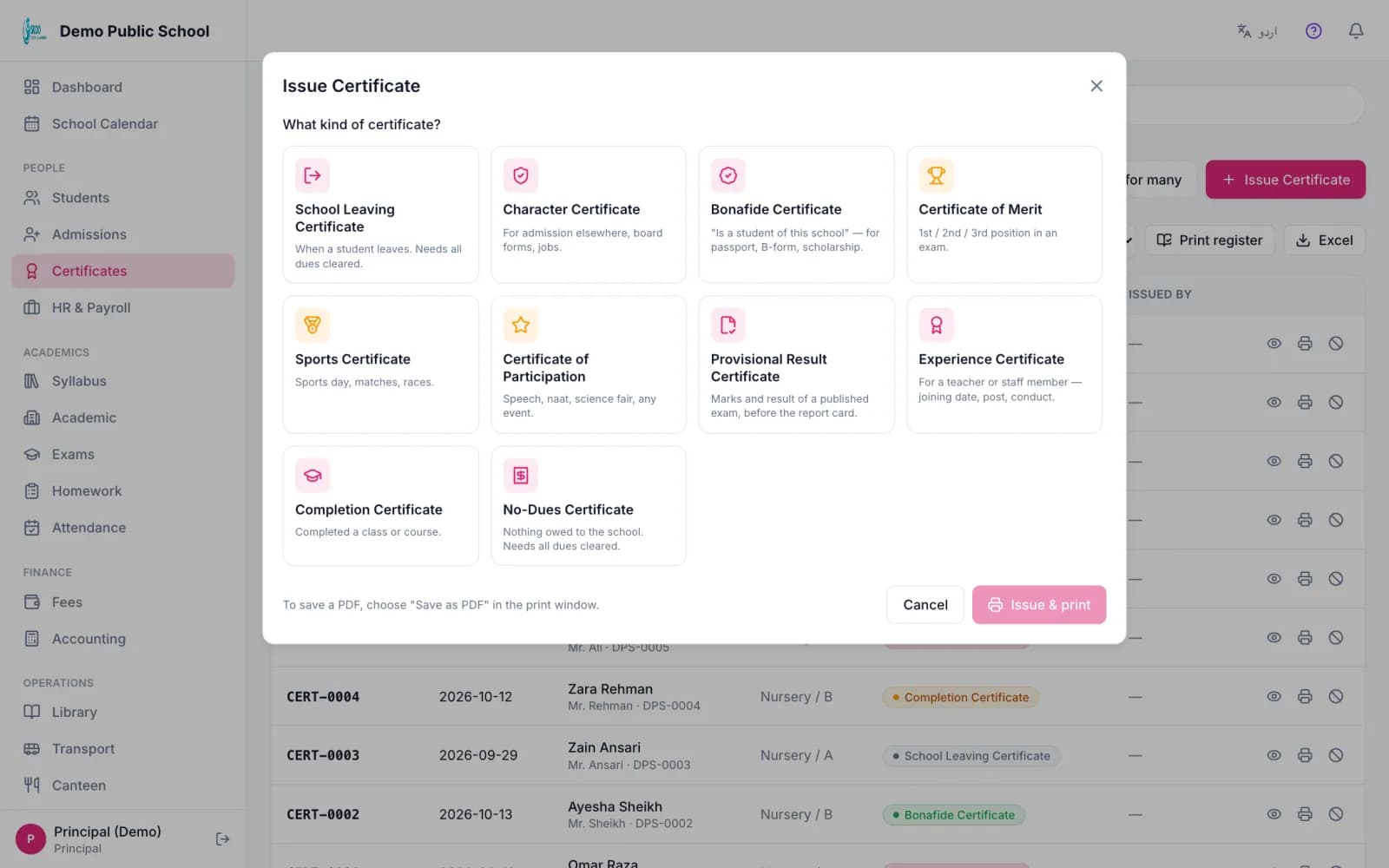
- Character, Bonafide, Provisional result, Completion and No dues.
- Merit, Sports and Participation.
- Experience certificate for staff.
- Your own types, with your own wording.
Your school's look
Set your school's Urdu name, registration number and motto once. Add up to three signers. Upload a photo of a signature or a stamp. Skoo removes the paper and keeps the ink. You choose which certificate types print the signature.
If you print on pre printed paper, switch on text only mode and nudge the position until it lines up.
Issue it with the certificate in front of you
- 1
Pick the type. Each card says when to use it.
- 2
Search the student and answer the few questions the type needs.
- 3
Skoo shows the real certificate filling in beside the form, and lists any detail the student record is missing, such as father's name.
- 4
For a leaving certificate, Skoo shows unpaid fees, books out and hostel dues. The principal can still issue it with a written reason, which goes into the register.
- 5
Print. The student can be marked as left in the same step.
Register and serial numbers
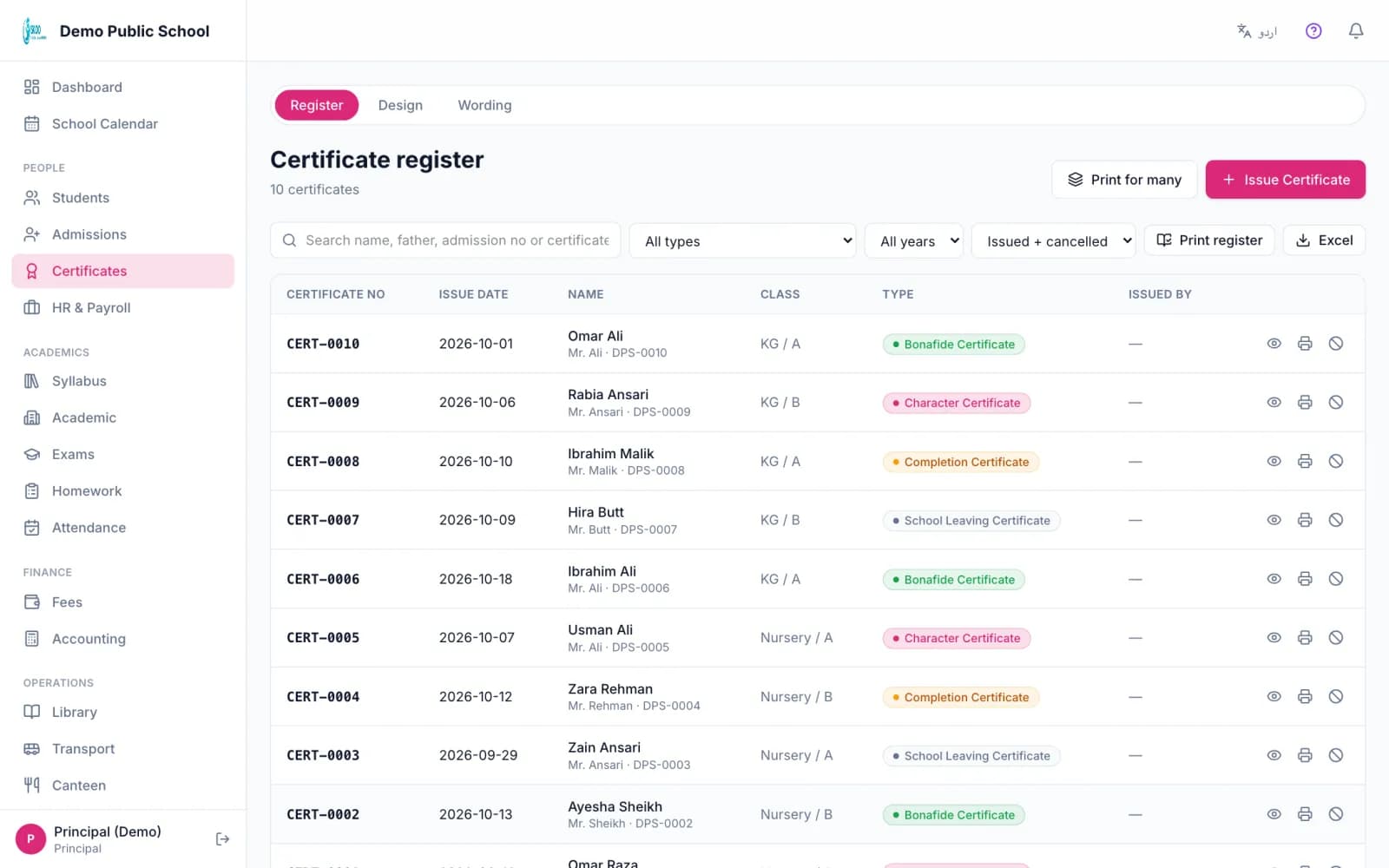
Each type has its own yearly number, for example SLC-2026-0001 or CHR-2026-0014. You can set the letters and the starting number so the register continues from your paper book.
Cancel a certificate with a reason and reprint it. A reprint is marked as a duplicate copy. You can export the register.
Many at once, and a QR check
- Merit certificates: choose a published exam and the first three of every class come ticked, with their position and percentage.
- Sports and participation: pick a class, tick the students, type the event once.
- Every certificate can carry a QR code. Scanning it opens a public page showing the school, type, serial number, student name, class, date and status. It shows no date of birth, B-form or phone number.
- Parents can ask for a certificate from the app. The office sees a count of requests and issues from there.
In the product
Screenshots from the Skoo demo school. The names and numbers are sample data.
Good to know: what it does not do
- Skoo prints certificates from your browser. It does not email a PDF to the parent.
- Certificate wording follows common Pakistani school forms. Your board or district may ask for its own format, so check before you print a large batch.
Questions, answered.
Can I print a school leaving certificate in Urdu?
Yes. Choose English, Urdu or both on the issue screen.
Will it block a leaving certificate when fees are unpaid?
It shows the dues and stops, unless the principal chooses to issue anyway and writes the reason, which is saved in the register.
Can another school check that my certificate is real?
If the QR code is on, anyone can scan it and see the school, type, serial number, name, class, date and status.
Can I add a type that is not in the list?
Yes. Add your own type and write its wording.
Can I continue my old register numbers?
Yes. Set the starting number for each type in the numbering settings.
See it with your own school's data.
Book a free 30-minute demo. We will walk through this part of Skoo and answer your questions.
Book a Free Demo