
School payroll and salary sheet software
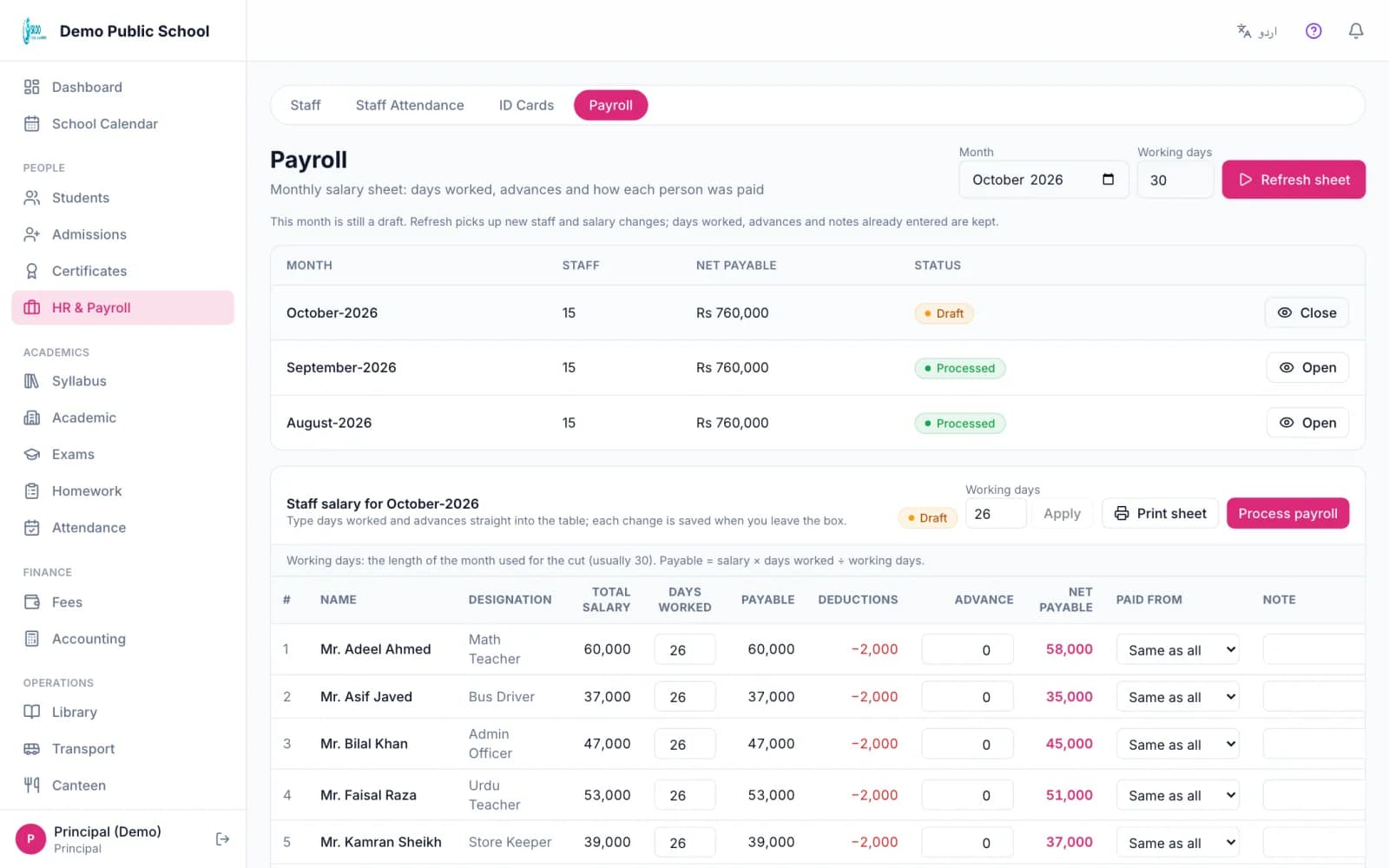
Skoo makes the monthly salary sheet for your staff from their salary structure. You adjust days worked and advances for each person, record how each salary was paid, and print the sheet. When you process the month, the payments post to your accounts.
Staff records
Each staff member has a record with name, designation, department, CNIC, qualification, shift, basic salary, allowances and deductions. Teachers, admin staff, drivers, nurses and wardens all go in the same list.
The monthly sheet
- 1
Pick the month and generate. Skoo makes one payslip for every active staff member with the basic salary, allowances and deductions. The month is set to 30 working days unless you change it.
- 2
For each person you can change the days worked. A full month pays the full salary. Fewer days reduce it in proportion.
- 3
Enter an advance to deduct. It can never take the net salary below zero. The payable amount is rounded to a whole rupee, as on a paper sheet.
- 4
Choose how the salary was paid: cash, bank or wallet, or mark it as already recorded. Set the date it was paid and add a note if you need to.
- 5
Process the month. A processed month is final and cannot be generated again by mistake.
Accounts
Processing posts salary payments to the ledger, one entry for each way of paying and each date. An advance goes to a staff advances account. If salaries were already entered in your books, choose recorded and Skoo posts nothing a second time.
Print the salary sheet for the month, with every staff member's basic salary, allowances, deductions, days worked, advance and net amount. Individual payslips can be printed too.
In the product
Screenshots from the Skoo demo school. The names and numbers are sample data.
Good to know: what it does not do
- Days worked are entered by hand. They do not come from staff attendance automatically yet.
- There is no advances register or increment history yet.
- Skoo does not send money to a bank. It records how you paid.
Questions, answered.
Can I deduct an advance from one person's salary?
Yes. Enter the advance on that person's payslip and it is taken off the payable amount.
Can I pay some staff in cash and some by bank?
Yes. Choose cash, bank or wallet for each person. Each way of paying and each date posts as its own entry.
Can I change a month after processing?
No. A processed month is final, so the sheet and the books agree.
Does it work with my existing accounts?
Yes. Salaries post through the accounts you connect in Account Settings.
See it with your own school's data.
Book a free 30-minute demo. We will walk through this part of Skoo and answer your questions.
Book a Free Demo